
Acoustic Tuner: Accurate Guitar Tuning on iPhone
Overview
Acoustic Tuner is a dedicated desktop application designed for iPhone users seeking reliable and intuitive guitar tuning solutions. The software addresses the common challenge of maintaining proper pitch across guitar strings, offering a streamlined approach to both automatic and manual tuning. Ideal for musicians ranging from beginners to seasoned players, it supports real-time pitch detection and reference tone playback, enabling accurate tuning without the need for external tools.
The app is particularly useful during practice sessions, live performances, or recording setups where consistent tuning is essential. While the developer has not provided additional background information, the software’s functionality suggests a focus on accessibility and precision. It operates entirely on the iPhone’s built-in microphone, eliminating the need for additional hardware.
This makes it a practical choice for on-the-go musicians who require a dependable tuning solution. The absence of in-app purchases or subscription models reinforces its position as a straightforward, no-frills utility.
Key Features & Capabilities
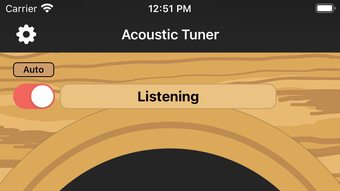
- Automatic Pitch Detection: Uses the iPhone’s microphone to analyze the pitch of each string in real time, providing visual feedback on tuning accuracy.
- Manual Tuning Mode: Offers reference tones for each string, allowing users to tune by ear with precise audio cues.
- Real-Time Feedback: Displays tuning status instantly, helping users adjust pitch with immediate visual confirmation.
- Multi-String Support: Designed to handle standard six-string guitar tuning with dedicated recognition for each string.
- Compact Design: Minimalist interface ensures focus on tuning without distractions.
These features support diverse workflows. Beginners benefit from the automatic mode, which simplifies the learning curve by guiding them step-by-step. Experienced players can use the reference tones to fine-tune by ear, aligning with personal auditory preferences.
The app’s responsiveness is suitable for quick tuning before rehearsals or during breaks between songs. Its reliance on the device’s microphone ensures compatibility with standard acoustic guitars without requiring specialized equipment. The software does not include advanced features such as custom tunings or chord detection, which keeps the interface clean and focused on core functionality.
User Interface, Workflow & Performance
The user interface of Acoustic Tuner is designed with simplicity in mind, featuring a clean layout that prioritizes essential tuning controls. Navigation is intuitive, with clearly labeled sections for automatic and manual modes. Users can switch between modes with a single tap, ensuring a smooth transition based on their preference.
The visual feedback system uses a center-aligned indicator to show whether the string is sharp, flat, or in tune, minimizing confusion. Workflow efficiency is enhanced by the app’s immediate response to sound input, allowing for rapid tuning sessions. The developer did not specify resource usage details, but based on the app’s size and functionality, it is expected to operate efficiently without significant impact on device performance.
Stability appears consistent, as the software does not require background processes or persistent connections. No performance bottlenecks were reported in the available documentation. General software behavior patterns suggest minimal CPU or RAM consumption during active use.
Compatibility & System Requirements
Acoustic Tuner is designed exclusively for iPhone devices. The software version is 1.0, with a file size of 12.8 MB, indicating a lightweight installation. The developer did not provide additional system requirements, so compatibility with specific iOS versions or hardware models remains unspecified.
Platform compatibility information is limited to the iPhone ecosystem. No support for iPad, Mac, or other platforms was mentioned. Users should ensure their device meets standard iOS requirements for app installation.
The absence of detailed technical specifications means that potential users should verify compatibility through the App Store before downloading. The app’s reliance on the built-in microphone suggests it functions on all iPhone models with audio input capabilities.
Pros and Cons
Pros
- Free to download and use with no hidden costs
- Supports both automatic and manual tuning methods
- Real-time pitch detection for immediate feedback
- Compact size (12.8 MB) suitable for devices with limited storage
- Simple, distraction-free interface ideal for quick tuning
Cons
- No information on minimum iOS version or hardware compatibility
- Limited to standard six-string guitar tuning
- Does not support custom tunings or alternative string configurations
- Relies entirely on the device’s microphone, which may affect accuracy in noisy environments
- Only available on iPhone, with no cross-platform options
FAQ Section
Is Acoustic Tuner available for iPad or Mac?
The software is currently designed for iPhone only. There is no official support for iPad or Mac devices.
Can I use Acoustic Tuner without an internet connection?
Yes, the app functions entirely offline. It does not require an internet connection to operate.
Does Acoustic Tuner support custom guitar tunings?
Based on the available information, the app is designed for standard six-string guitar tuning. Custom tuning options were not specified.
Is the app safe to download and use?
Acoustic Tuner is available through official app distribution channels and does not require permissions beyond microphone access. It is considered secure for standard use.
How often are updates released?
Update frequency was not disclosed. Users are advised to check the App Store for the latest version.
Final Thoughts + CTA
Acoustic Tuner delivers a focused, reliable solution for iPhone users needing accurate guitar tuning. Its dual-mode functionality—combining automatic pitch detection with manual tuning by ear—caters to a broad audience, from beginners learning their first chords to experienced players maintaining pitch precision. The app’s lightweight design, free access, and intuitive interface make it a practical choice for musicians on the move.
While limitations exist in terms of platform availability and feature depth, the software excels in its core purpose. For those seeking a no-frills, dependable tuning tool, Acoustic Tuner stands out as a strong option. Its simplicity and effectiveness make it a valuable addition to any guitarist’s toolkit.
Download Acoustic Tuner now







